---
title: Campaigns
description: Campaigns
---
[Skip to content](https://support.trillion.com/campaigns#main-content)
[](https://www.trillion.com/)
- PRODUCTS
Show submenu for PRODUCTS
- [PRODUCTS & BRAND SEARCH](https://www.trillion.com/#Product-Brand-Search)
- [Browser Search](https://www.trillion.com/#Product-Brand-Search)
- [BNPL](https://www.trillion.com/#Product-Brand-Search)
- [Coupon](https://www.trillion.com/#Product-Brand-Search)
- [CONTENT & CONTEXTUAL](https://www.trillion.com/#Content-Contextual)
- [Tiles](https://www.trillion.com/#Content-Contextual)
- [Email](https://www.trillion.com/#Content-Contextual)
- [Content Links](https://www.trillion.com/#Content-Contextual)
- [Contextual Ad Block](https://www.trillion.com/#Contextual-Ad-Block)
- COMPANY
Show submenu for COMPANY
- [About Trillion](https://www.trillion.com/company.html)
- [Trillion Brands](https://www.trillion.com/brands.html)
- [Blog](https://www.trillion.com/blog)
- [Our Team](https://www.trillion.com/our-team.html)
- [Careers at Trillion](https://www.trillion.com/careers.html)
- [CONTACT](https://www.trillion.com/contact.html)
- [LOGIN](https://www.trillion.com/login.html)
Open main navigation
Close main navigation
- PRODUCTS
Show submenu for PRODUCTS
- [PRODUCTS & BRAND SEARCH](https://www.trillion.com/#Product-Brand-Search)
- [Browser Search](https://www.trillion.com/#Product-Brand-Search)
- [BNPL](https://www.trillion.com/#Product-Brand-Search)
- [Coupon](https://www.trillion.com/#Product-Brand-Search)
- [CONTENT & CONTEXTUAL](https://www.trillion.com/#Content-Contextual)
- [Tiles](https://www.trillion.com/#Content-Contextual)
- [Email](https://www.trillion.com/#Content-Contextual)
- [Content Links](https://www.trillion.com/#Content-Contextual)
- [Contextual Ad Block](https://www.trillion.com/#Contextual-Ad-Block)
- COMPANY
Show submenu for COMPANY
- [About Trillion](https://www.trillion.com/company.html)
- [Trillion Brands](https://www.trillion.com/brands.html)
- [Blog](https://www.trillion.com/blog)
- [Our Team](https://www.trillion.com/our-team.html)
- [Careers at Trillion](https://www.trillion.com/careers.html)
- [CONTACT](https://www.trillion.com/contact.html)
- [LOGIN](https://www.trillion.com/login.html)
- [GET STARTED](https://www.trillion.com/request-demo.html)
[GET STARTED](https://www.trillion.com/request-demo.html)
How can we help you?
- There are no suggestions because the search field is empty.
1. [Trillion.com Knowledgebase](https://support.trillion.com/?hsLang=en)
2. [Campaign](https://support.trillion.com/campaign?hsLang=en)
# Campaigns
#### Campaign
Campaigns allow a user to organize their keywords in the dashboard. Cmpaigns can also provide certain settings that affect all the keywords/brands/segments contained within them.
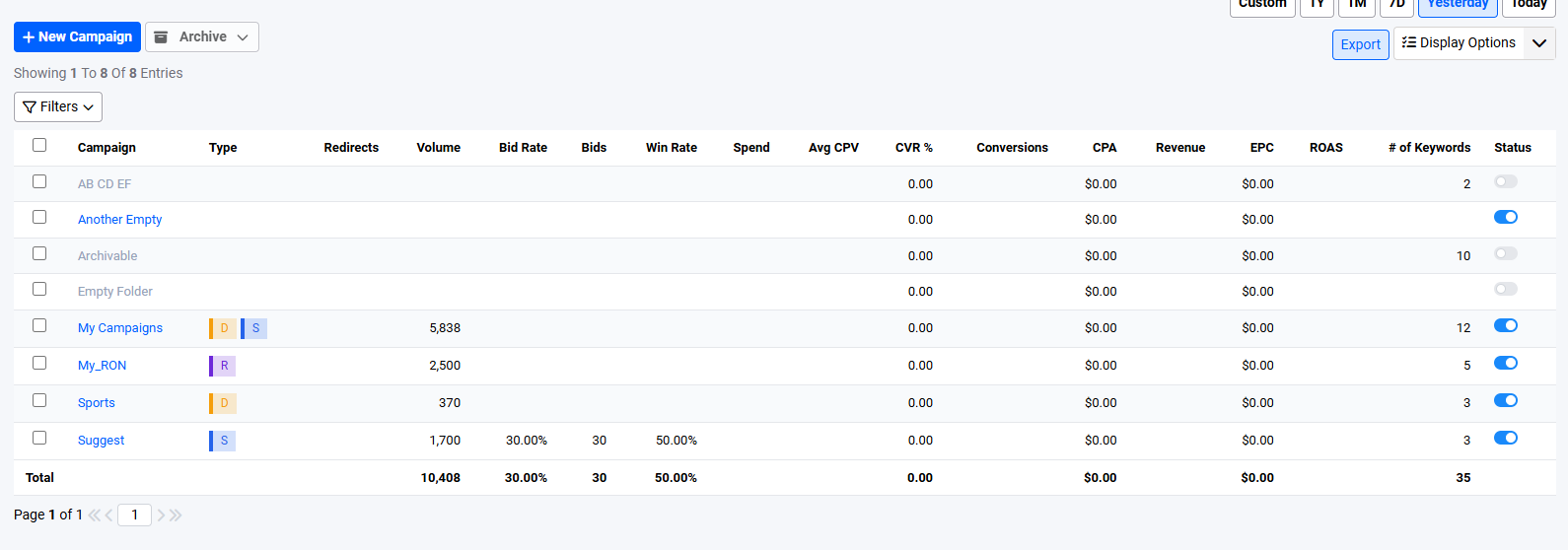Campaign view (Dashboard)
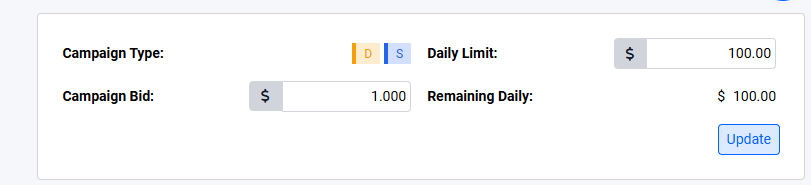Campaign settings
These settings include the campaign bid and the daily limit:
1\. Campaign Type
- This indicates the type of keywords (Direct, Suggest, or RON) that are contained in the current campaign being viewed.
2\. Campaign Bid
- This is the base bid that will be utilized by all keywords inside the campaign. Changing it will affect all keywords of the campaign.
- This value is required for all campaigns
- This value must only be a positive value numeric
- This value cannot be higher than the daily limit
3\. Daily Limit
- Daily Limit to apply over the entire campaign. Once fully reached, all keywords bids will be paused.
- Campaign level daily limit is disabled by default and needs to be enabled by an account manager upon request. When enabled, the following rules apply:
- Daily limit cannot exceed $1,000,000
- Daily limit is required
4\. Remaining Daily
- The budget remaining for the day. Computed as Daily Limit - Current Spend
### Campaign Stats
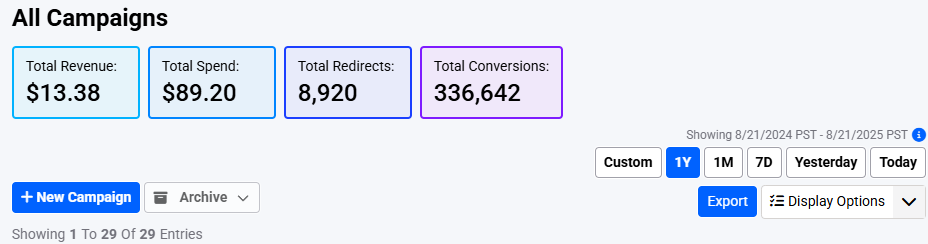The above shows the stats for all of the user's campaigns across a one year period
On the campaigns page, there are stats displayed for the entire user account. This represents the totals for the selected report date range (Yesterday, Today, 1M, 1Y, etc.)
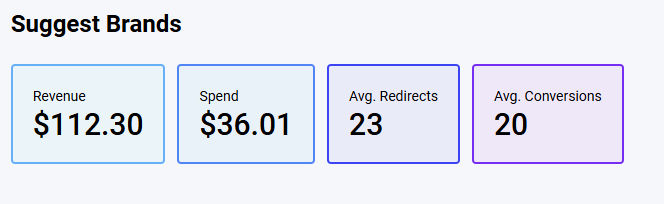Stats displayed on campaign pages
Displays the stats for only the particular campaign (Suggest Brands). On the keywords and subids page, the stats for the specific campaign the user is viewing is displayed. It is also dependent on the report date selected.
### Filtered Totals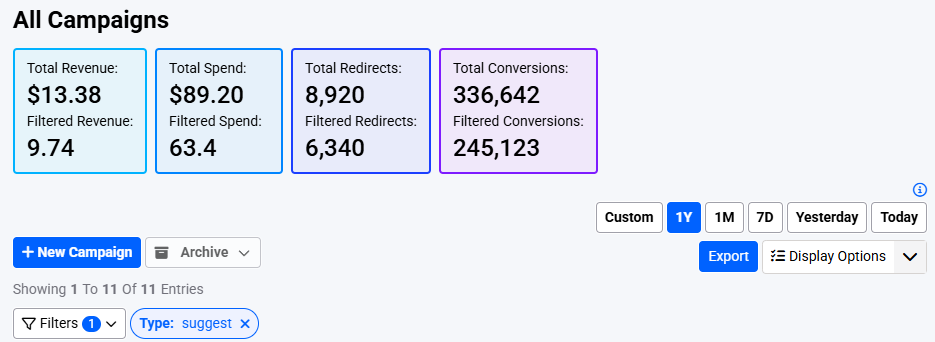
If the user has applied any filters, these are shown separately from the totals
For example, the filtered stats show the stats for user's suggest campaigns (based on the applied filter), while the (unfiltered) total continues to show the stats for all of the user's campaigns in the 1 year period.
- [Campaign](https://support.trillion.com/campaign?hsLang=en)
- [New Features](https://support.trillion.com/new-features?hsLang=en)
- [Reporting](https://support.trillion.com/reporting?hsLang=en)
[](https://www.trillion.com)
8 East Concourse, Beaumaris, VIC, 3193, Australia
[mailto:email@email.com](mailto:email@email.com)
Copyright © 2025, Trillion Pty Ltd
TRILLION COMPANY
[Home](https://www.trillion.com/)
[About Us](https://www.trillion.com/company.html)
[Contact Us](https://www.trillion.com/contact.html)
[Trillion Brands](https://www.trillion.com/brands.html)
[Our Team](https://www.trillion.com/our-team.html)
[Careers](https://www.trillion.com/careers.html)
[Blog](https://www.trillion.com/blog)
[Sitemap](https://www.trillion.com/sitemap.html)
TRILLION PRODUCTS
[Browser Search](https://www.trillion.com/#Product-Brand-Search)
[BNPL](https://www.trillion.com/#Product-Brand-Search)
[Coupon](https://www.trillion.com/#Product-Brand-Search)
[Tiles](https://www.trillion.com/#Content-Contextual)
[Email](https://www.trillion.com/#Content-Contextual)
[Content Links](https://www.trillion.com/#Content-Contextual)
[Contextual Ad Block](https://www.trillion.com/#Contextual-Ad-Block)
OTHER TRILLION SERVICES
[Domain Marketplace](http://www.above.com/marketplace/)
[Domain Parking](http://www.above.com/)
[Domain Registrations](http://www.above.com/registrar/)
[Manage Customer Reviews](https://addme.com/)
[Local SEO Services](https://beontop.com/)
[Website Hosting](https://www.help.com/)
[Safe Browser](https://www.domainshield.com.au/)
LEGAL
[Terms of Use](https://www.trillion.com/terms.html)
[Privacy Policy](https://www.trillion.com/privacy.html)
[Advertiser Terms and Conditions](https://www.trillion.com/advertiser-terms-and-conditions.html)
[Subscribe To Newsletter](https://www.trillion.com/)
Copyright © 1997 - Trillion.com Pty Ltd - All Rights Reserved.