
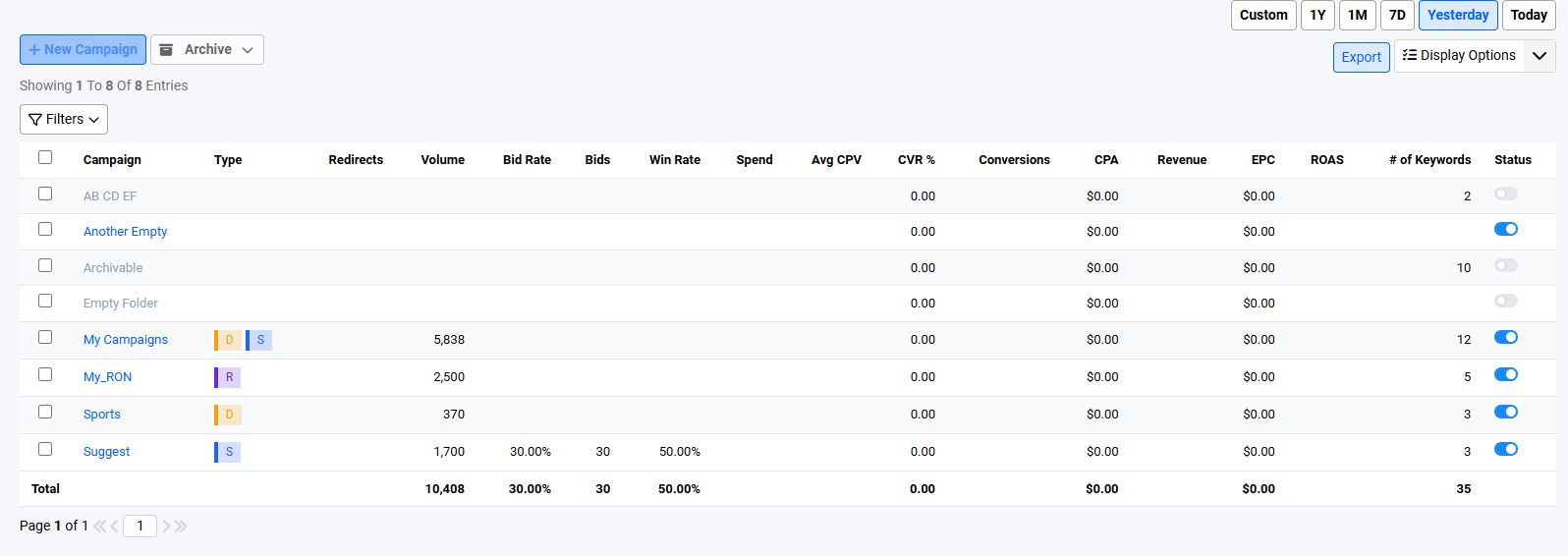
The campaign page allows the user to see the statistics of their campaigns. This page serves as the default dashboard page that the user is greeted when they click on the Trillion logo on the left of the top navigation bar and when they login to the platform.
 Clicking on these redirects to the dashboard page
From here the user can drill down to a particular campaign to see the other corresponding views (e.g. keywords and subids) of the campaign by clicking on the campaign name.
Enabling / Disabling of Campaigns

The user can enable or disable their campaigns via this page. Disabling a campaign causes keywords inside the campaign to stop working until the campaign is re-enabled.
Archival of Campaigns
The user can choose to archive certain campaigns from this page. Doing so will disable the campaign and any keywords that are inside it.
- Compared to just disabling a campaign which also disables any keywords inside the campaign, the process of archiving a campaign indicates that the user is unlikely to work with the campaign again anytime soon and would probably not want to see it in the campaign report.
- The user can choose to unarchive their campaigns at any time and they will resume functioning normally with the keywords inside.
- Keywords can be archived independently of their corresponding campaign. If an archived campaign is unarchived, the campaign's keywords that were archived directly will still remain as archived and not run.
Steps to archive campaigns
- Select the campaigns to archive via the checkboxes on the left of the table
- Click the archive dropdown, and select archive from the dropdown options
- A confirmation modal is displayed to show the campaigns to archive
- The user can choose to remove campaigns from this modal prior to confirming the archival
- Click OK to confirm
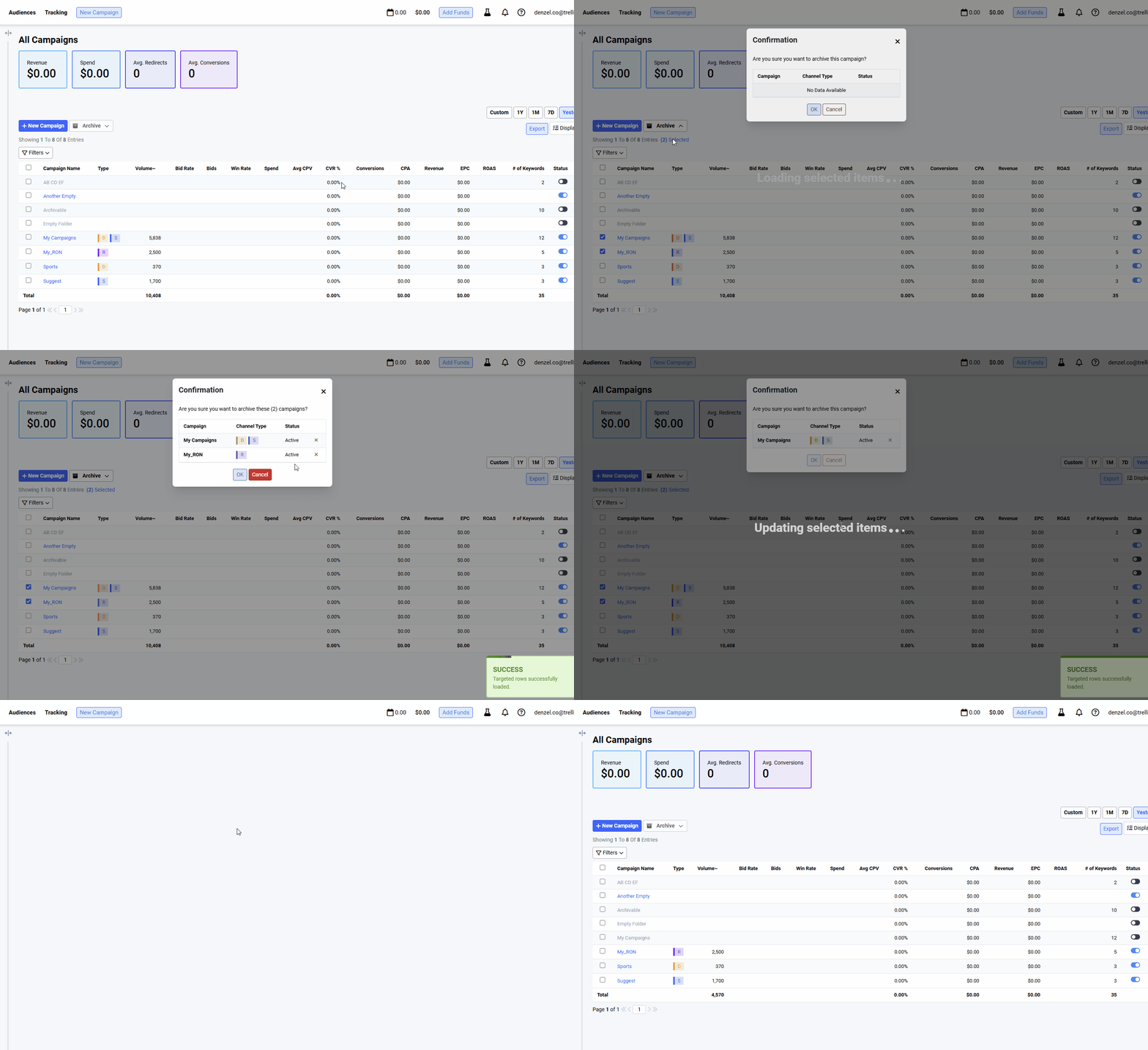
Steps to unarchive campaigns
- Select the archived campaigns to archive via the checkboxes on the left of the table
- Note that to unarchive campaigns, the Hide Archived Campaigns filter option should be disabled, otherwise the user cannot see and select the archived campaigns
- Click the archive dropdown, and select un-archive from the dropdown options
- A confirmation modal is displayed to show the campaigns to unarchive
- The user can choose to remove campaigns from this modal prior to confirming the un-archival
- Click OK to confirm
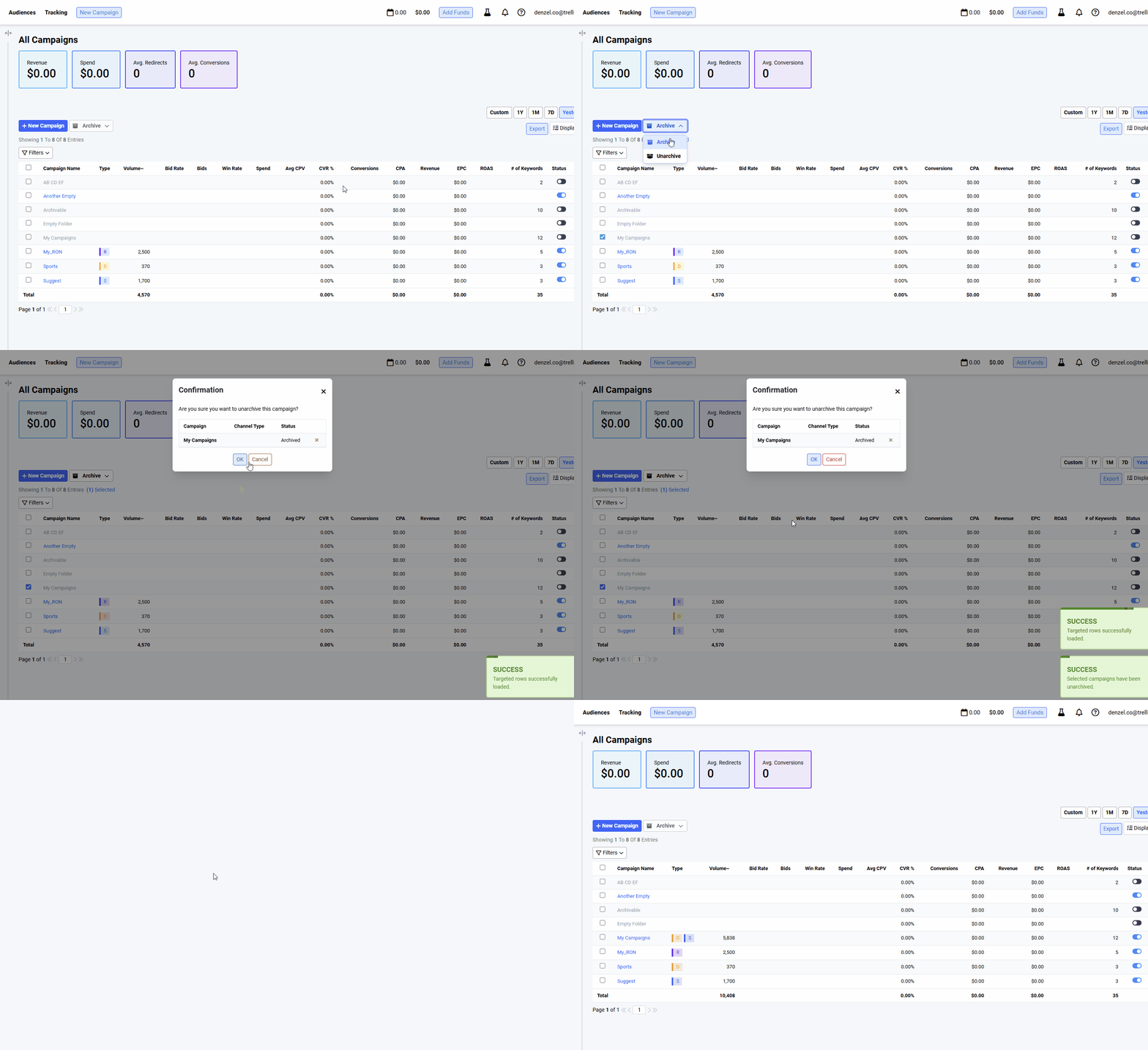
Toggling Visibility of Archived Campaigns
If the hide archived campaigns options is enabled (default), archived campaigns are hidden from the user's view. Otherwise they are displayed but the campaign name is grayed out from the table to indicate its archived state.
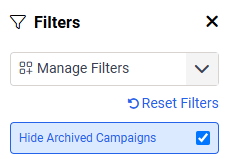 Visibility of archived campaigns can be toggled in the filters popup
 Grayed out campaign names for archived ones
Columns
| Column | Column Type | Filter Type | Description |
|---|---|---|---|
| Type | Text | List | The campaign types included in the campaign |
| Volume~ | Numeric | Range | The estimated volume of the keywords inside the campaign |
| Campaign Bid | Numeric | Range | The base campaign bid assigned by the user. By default is assigned a value of $1 |
| Daily Limit | Numeric | Range | The daily limit for the campaign assigned by the user. |
| Bid Rate | Numeric | Range | The bid rate % of the campaign. Note that this is currently supported only for suggest. Direct keywords are not included in the aggregated total and if the campaign contains only direct keywords, it will be blank. Computed as bids / requests * 100 |
| Win Rate | Numeric | Range | The win rate % of the campaign. Currently available only for suggest |
| Bids | Numeric | Range | The total number of bids the user has made for the campaign. Currently available only for suggest |
| Redirects | Numeric | Range | The total number of redirects |
| Spend | Numeric | Range | The total cost for the campaign |
| Avg CPV | Numeric | Range | The average cost per visit. |
| CVR | Numeric | Range | Conversion Rate. Haven't decided yet whether or not to include remarketed visitors. It should. Remarketed Visits should be include in Total Visits where these are calculated from. |
| Conversions | Numeric | Range | The number of visitors that spent money on the advertiser's website. |
| CPA | Numeric | Range | Cost per Acquisition. This is how much the user paid for each conversion. Haven't decided yet whether or not to include remarketed visitors. |
| EPC | Numeric | Range | Earnings per click. Calculated as user_roi (Revenue) / real_user_visitors (Redirects) |
| ROAS | Numeric | Return on Ad Spends. Advertiser wants to know how much they earn from what they spend. Something Like profit margin. calculated as Revenue / SpendIdeally > 1, otherwise the advertiser is losing money |
Notes:
- Archived keywords inside the campaign are not included in the aggregated values