---
title: Side Nav Bar
description: Side Nav Bar
---
[Skip to content](https://support.trillion.com/side-nav-bar#main-content)
[](https://www.trillion.com/)
- PRODUCTS
Show submenu for PRODUCTS
- [PRODUCTS & BRAND SEARCH](https://www.trillion.com/#Product-Brand-Search)
- [Browser Search](https://www.trillion.com/#Product-Brand-Search)
- [BNPL](https://www.trillion.com/#Product-Brand-Search)
- [Coupon](https://www.trillion.com/#Product-Brand-Search)
- [CONTENT & CONTEXTUAL](https://www.trillion.com/#Content-Contextual)
- [Tiles](https://www.trillion.com/#Content-Contextual)
- [Email](https://www.trillion.com/#Content-Contextual)
- [Content Links](https://www.trillion.com/#Content-Contextual)
- [Contextual Ad Block](https://www.trillion.com/#Contextual-Ad-Block)
- COMPANY
Show submenu for COMPANY
- [About Trillion](https://www.trillion.com/company.html)
- [Trillion Brands](https://www.trillion.com/brands.html)
- [Blog](https://www.trillion.com/blog)
- [Our Team](https://www.trillion.com/our-team.html)
- [Careers at Trillion](https://www.trillion.com/careers.html)
- [CONTACT](https://www.trillion.com/contact.html)
- [LOGIN](https://www.trillion.com/login.html)
Open main navigation
Close main navigation
- PRODUCTS
Show submenu for PRODUCTS
- [PRODUCTS & BRAND SEARCH](https://www.trillion.com/#Product-Brand-Search)
- [Browser Search](https://www.trillion.com/#Product-Brand-Search)
- [BNPL](https://www.trillion.com/#Product-Brand-Search)
- [Coupon](https://www.trillion.com/#Product-Brand-Search)
- [CONTENT & CONTEXTUAL](https://www.trillion.com/#Content-Contextual)
- [Tiles](https://www.trillion.com/#Content-Contextual)
- [Email](https://www.trillion.com/#Content-Contextual)
- [Content Links](https://www.trillion.com/#Content-Contextual)
- [Contextual Ad Block](https://www.trillion.com/#Contextual-Ad-Block)
- COMPANY
Show submenu for COMPANY
- [About Trillion](https://www.trillion.com/company.html)
- [Trillion Brands](https://www.trillion.com/brands.html)
- [Blog](https://www.trillion.com/blog)
- [Our Team](https://www.trillion.com/our-team.html)
- [Careers at Trillion](https://www.trillion.com/careers.html)
- [CONTACT](https://www.trillion.com/contact.html)
- [LOGIN](https://www.trillion.com/login.html)
- [GET STARTED](https://www.trillion.com/request-demo.html)
[GET STARTED](https://www.trillion.com/request-demo.html)
How can we help you?
- There are no suggestions because the search field is empty.
1. [Trillion.com Knowledgebase](https://support.trillion.com/?hsLang=en)
2. [New Features](https://support.trillion.com/new-features?hsLang=en)
# Side Nav Bar
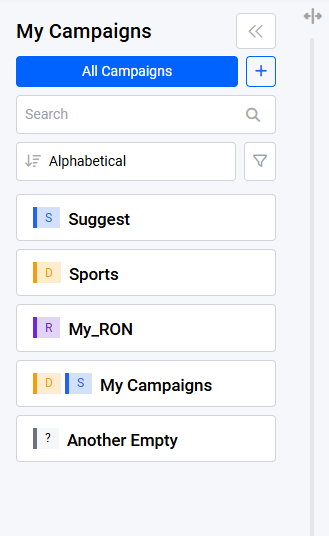
The side navigation bar is a component that allows quick access to the user's campaigns. It is always made accessible to the user regardless of the current page they are on.
#### Access Links
The side navigation bar provides quick access links to the dashboard page via the **All Campaigns** button and a link to create a new campaign via the plus button
Clicking redirects to Sports campaign Keywords Page
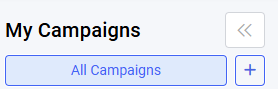Clicking will redirect to the dashboard page
#### Type Labels
Depending on the contents of the campaign, there will be a label indicated on the left side of each campaign. Possible labels are:
| Label | Description |
| --- | --- |
| **S** | Contains **suggest** brand/s |
| **D** | Contains **direct** keyword/s |
| **R** | Contains Run of Network (RON) segment/s |
| ? | Campaign is empty |
#### Resizing / Collapsing the Side Navigation Bar
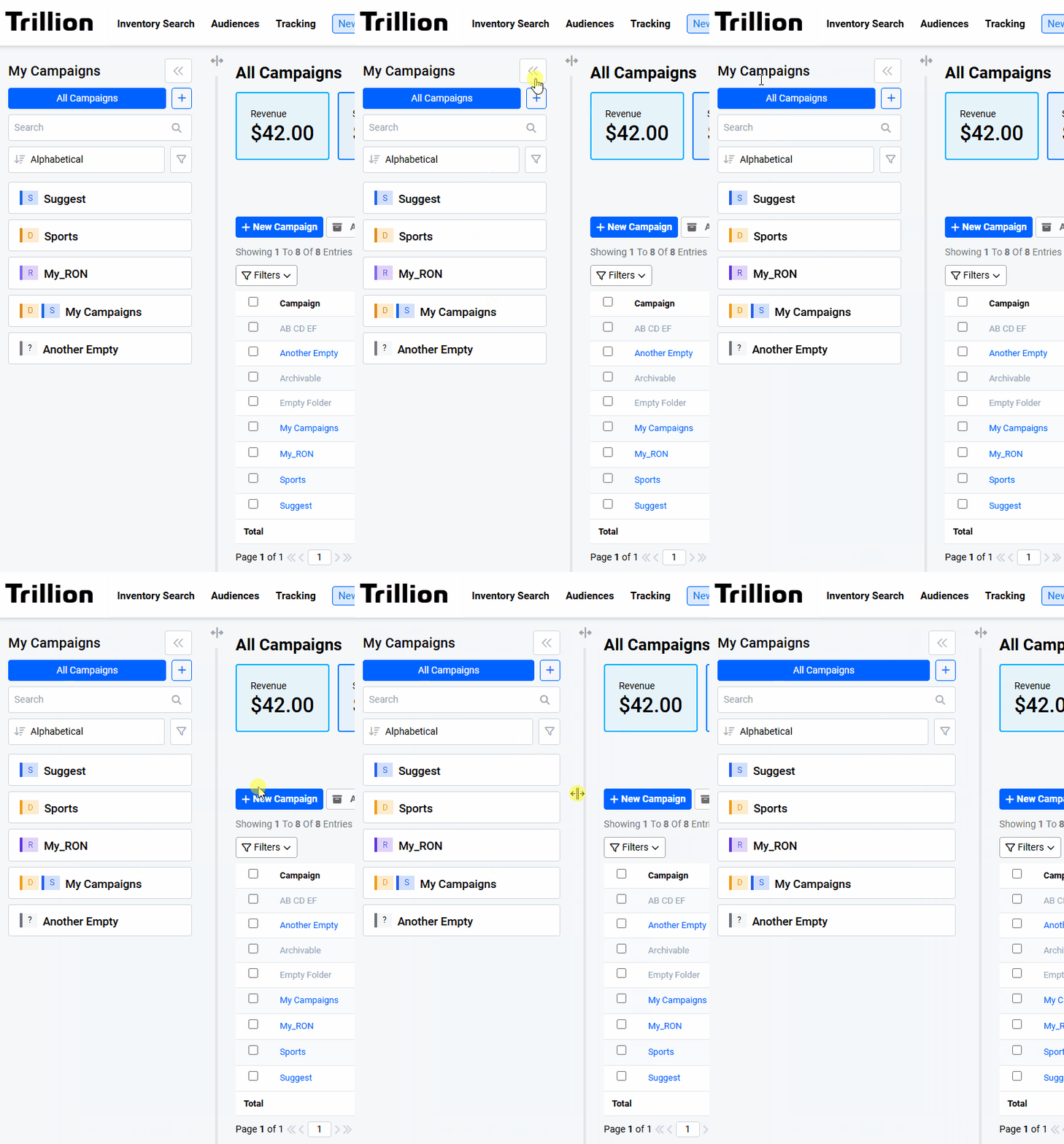Resizing and collapsing of side navigation bar
The side navigation bar can be resized or collapsed depending on the user's preference.
#### General Search
The general search feature allows the user to quickly find a campaign by a search term. This search term is matched both against the campaign names and the keywords inside the campaigns.
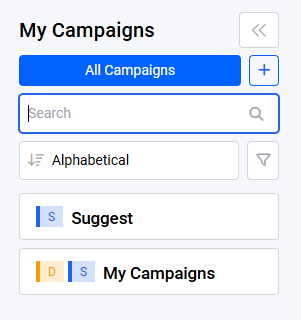
Features:
1. The list of campaigns is filtered against the search term when the user focuses out of the search field.
2. The text that is matching the campaign name will be highlighted in blue
3. The entered term also matches against keywords inside the campaign
4. Only campaigns that either have a match against its name or one of its' keywords will be displayed if a search term is entered
5. If there are keywords inside a given campaign matching the specified term, a number is displayed on the right of the campaign name indicating the number of keywords
1. Clicking on a campaign with keyword matches will open the campaign with keywords filter automatically applied
6. The last search term of the user is persisted against the user's account
1. Persistence applied over different devices and browsers for the same user account
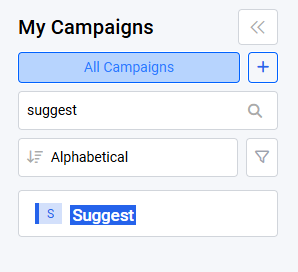Matching substring in the campaign is highlighted keyword matches.
This shows us the Suggest campaign has two keywords matching "nike" while My Campaigns has one match.
#### Advanced Filtering
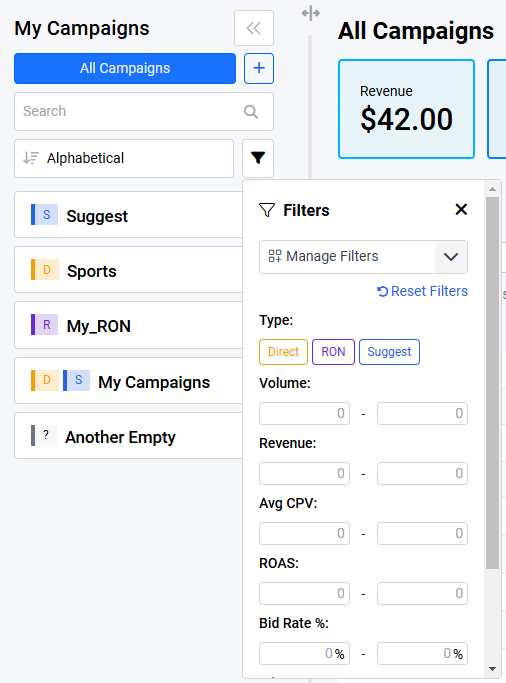
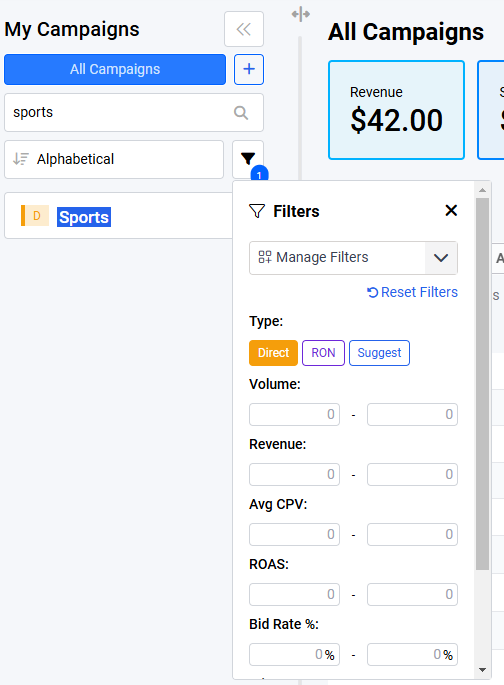
Advanced filtering is available on the side navigation bar. This allows the user to use a more specific set of criteria to filter the campaign list with. These can be used alongside the general search field.
For example if the user wants to search for campaigns with a particular substring containing direct keywords.
Due to the large number of filters, there is also a feature to select only the filters that user prefers to work with. For example, the image below enables only win rate, bid rate and type filters.
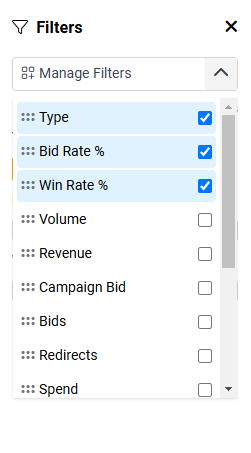
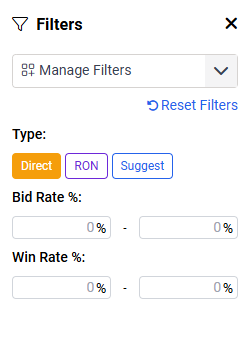
The visibility settings of the filters are persisted and will be tied directly to each user's account.
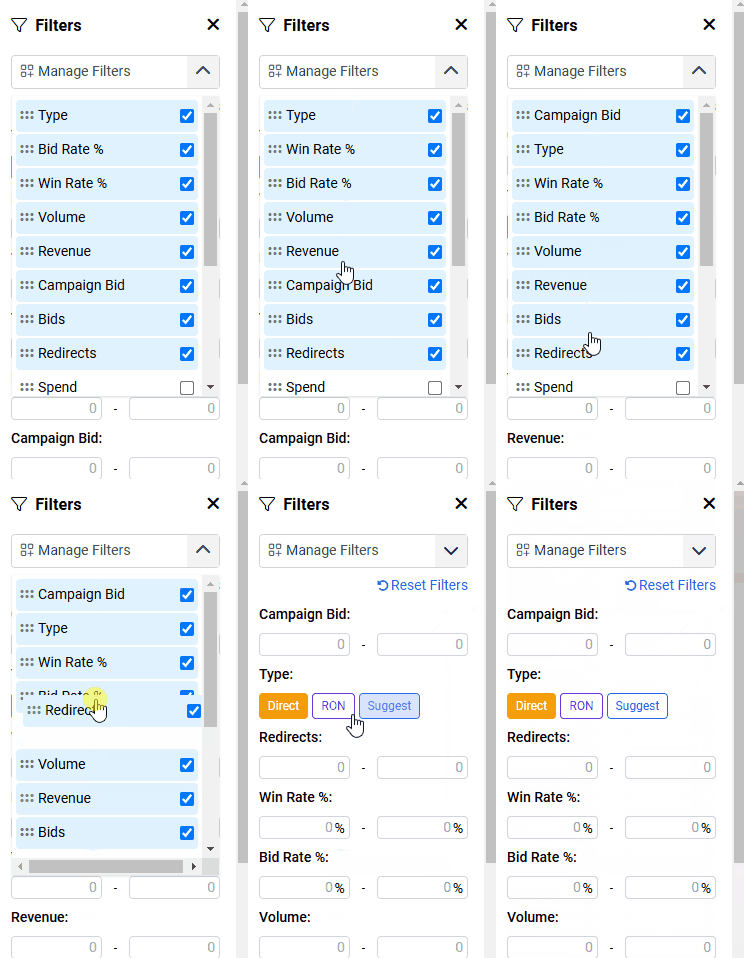
Apart from visibility the user can also rearrange how they are displayed like so:
- [Campaign](https://support.trillion.com/campaign?hsLang=en)
- [New Features](https://support.trillion.com/new-features?hsLang=en)
- [Reporting](https://support.trillion.com/reporting?hsLang=en)
[](https://www.trillion.com)
8 East Concourse, Beaumaris, VIC, 3193, Australia
[mailto:email@email.com](mailto:email@email.com)
Copyright © 2025, Trillion Pty Ltd
TRILLION COMPANY
[Home](https://www.trillion.com/)
[About Us](https://www.trillion.com/company.html)
[Contact Us](https://www.trillion.com/contact.html)
[Trillion Brands](https://www.trillion.com/brands.html)
[Our Team](https://www.trillion.com/our-team.html)
[Careers](https://www.trillion.com/careers.html)
[Blog](https://www.trillion.com/blog)
[Sitemap](https://www.trillion.com/sitemap.html)
TRILLION PRODUCTS
[Browser Search](https://www.trillion.com/#Product-Brand-Search)
[BNPL](https://www.trillion.com/#Product-Brand-Search)
[Coupon](https://www.trillion.com/#Product-Brand-Search)
[Tiles](https://www.trillion.com/#Content-Contextual)
[Email](https://www.trillion.com/#Content-Contextual)
[Content Links](https://www.trillion.com/#Content-Contextual)
[Contextual Ad Block](https://www.trillion.com/#Contextual-Ad-Block)
OTHER TRILLION SERVICES
[Domain Marketplace](http://www.above.com/marketplace/)
[Domain Parking](http://www.above.com/)
[Domain Registrations](http://www.above.com/registrar/)
[Manage Customer Reviews](https://addme.com/)
[Local SEO Services](https://beontop.com/)
[Website Hosting](https://www.help.com/)
[Safe Browser](https://www.domainshield.com.au/)
LEGAL
[Terms of Use](https://www.trillion.com/terms.html)
[Privacy Policy](https://www.trillion.com/privacy.html)
[Advertiser Terms and Conditions](https://www.trillion.com/advertiser-terms-and-conditions.html)
[Subscribe To Newsletter](https://www.trillion.com/)
Copyright © 1997 - Trillion.com Pty Ltd - All Rights Reserved.